


Gametime - Last Minute Tickets
4.837.02K Reviews
App Specs
- Version
- 2026.18.0
- Updated On
- License
- Free
- Downloads
- 5,000,000+
- Developer
- Gametime
- Categories
- Events
- Platform
- Android, iOS
Screenshots
 Analysis by AppCompare
Gametime - Last Minute Tickets makes the most sense when you want to go out soon and are willing to be flexible about what you see or where you sit. I find that focus refreshing: instead of treating ticket hunting as a months-long project, the app is built around finding live events and available seats when plans are taking shape. It is not the right fit for every purchase, though. If I need a very particular seat, want to compare every seller in one place, or prefer to plan far ahead, I would look beyond a last-minute-focused app before deciding.
A useful shortcut when plans are still flexible
The clearest advantage is the way Gametime brings event browsing and ticket buying together for sports, concerts, festivals, and comedy. In practical terms, that suits the familiar moment when a friend messages on a Friday afternoon asking what to do that evening. Rather than starting with one fixed event and treating sold-out search results as the end of the road, I can look at what is happening nearby and weigh options against the group’s mood, timing, and budget.
That flexibility is also the main trade-off. A last-minute deal only helps if the event, available seats, and timing work for you. I would decide first what matters most—seeing a particular performer, sitting together, staying within a budget, or simply getting into a live event—then use the app to explore. If the event itself is non-negotiable, it is wise not to assume that a desirable seat or price will appear just because the date is close.
What I would check before paying
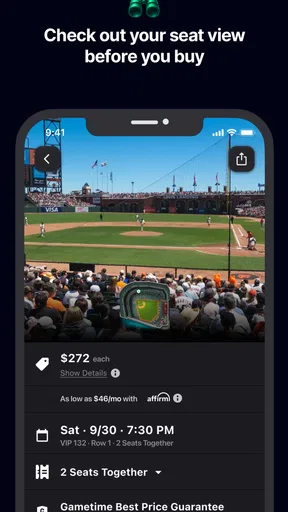
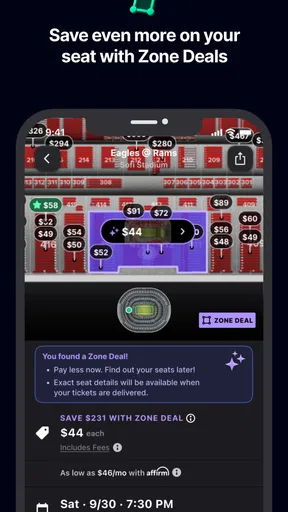
Seat-view information is one of the more practical details in the original experience. I would use it as a comparison tool rather than a promise of exactly what the night will look like: sightlines can feel different depending on the venue and the event, and a view preview cannot tell me how a crowd or stage setup will affect the experience. When two listings seem similar, it can help me think beyond the seat’s location and decide whether the view is worth the difference to me.
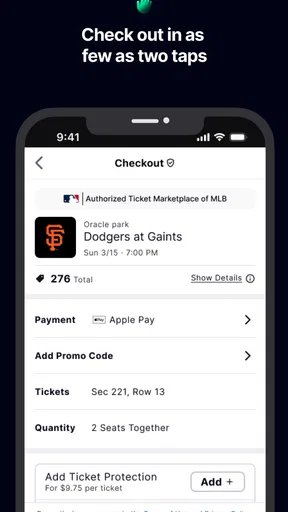
I would also pause at checkout long enough to review the total and the ticket details before confirming. The original experience describes a straightforward payment process, including credit cards and Apple Pay, but convenience is not a reason to rush. For a group, I would agree on the maximum spend and seating preference before searching. That small step can prevent one person from choosing an option the rest of the group would not accept.
It is sensible to treat availability as time-sensitive when shopping close to an event. I would shortlist a few acceptable choices rather than fall in love with one listing, then move promptly once the group agrees. This is not a claim that every listing changes at a particular pace; it is simply a practical way to avoid letting a spontaneous plan turn into a long back-and-forth while the options you liked may no longer be available.
How it fits beside other ticket searches
Compared with searching only through a venue or event organizer, a dedicated ticket app can be more convenient when I am still choosing what to attend or looking for availability close to the date. An organizer’s own channel may be the better starting point when I want official event information, a specific ticket type, or a seat selection tied directly to that event. I see those approaches as complementary: Gametime is useful for discovery and last-minute options, while a direct event source can make more sense when I already know exactly what I want.
Worth Reading Before You Choose

Flipboard Shows What News Apps Must Do Beyond the Feed

Switching to Android Auto Means Rethinking Your Driving Routine

Google Calendar Makes a Crowded Week Easier to Manage

Ludo King Makes the Most of the Minutes Between Plans

Baby Panda World Brings Quick Play to Modern Phones, but Its Game Library Feels Busy

ESPN’s Live Game View Makes Following Close Games Easier
It also differs from simply asking friends or checking social posts for spare tickets. Those routes can be helpful when someone I trust has a ticket to pass along, but they may require more coordination and leave me doing extra work to judge the offer. The app’s stated guarantee and user feedback can make the buying process feel more structured; still, I would read the listing carefully and keep the purchase process within the app rather than relying on an informal promise from a stranger.
Who is likely to get the most from it?
I would recommend it most to people who enjoy live events but do not need every detail settled weeks in advance: friends looking for a spontaneous night out, sports fans open to different games, or concertgoers who can be flexible about seating. It may also suit someone who wants one place to browse several kinds of events rather than checking each category separately. The developer is Gametime, and the app is free to download, so trying its search experience does not require an upfront purchase of the app itself.
By contrast, I would be cautious about relying on it as my only plan if I am organizing a large group, need adjacent seats, have accessibility requirements that must be confirmed, or am traveling specifically for one event. In those cases, I would verify the relevant details with the event source before committing. The same goes for anyone who finds changing options stressful: browsing close to the event can be exciting, but the uncertainty is part of the deal, not a flaw that an app can remove.
Everyday details that matter
For a realistic evening plan, imagine that I finish work and discover that friends are already downtown with no fixed plan. I can search around the area, compare a game with a comedy show or concert, and share a small set of realistic options before the group decides. The useful workflow is not to scroll endlessly; it is to agree on a time window and spending limit first, then compare event and seat choices that satisfy both. If nothing looks right, we can stop searching instead of treating a ticket purchase as the only way to save the evening.
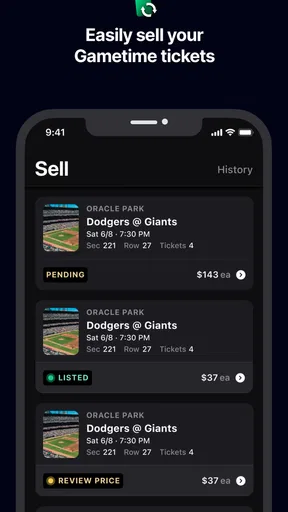
If plans change after buying, the original review points to “Snap and Sell” as a way to resell a ticket in a few taps. I would view that as a useful fallback, not a guarantee that a ticket will sell or that resale will suit every situation. It is most helpful to know the option exists before an unexpected schedule change, while still checking the in-app terms and ticket details at the point of use.
Getting Down to the Basics
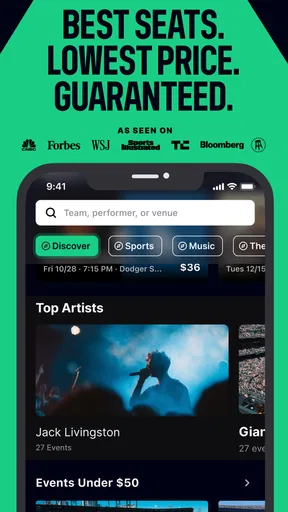
So, here’s the lowdown. Gametime - Last Minute Tickets is like your personal ticket fairy godmother. Whether you’re into sports, concerts, or theater, this app hooks you up with tickets even when it seems like everything’s sold out. The interface? A breeze to use. I was pleasantly surprised by how easy it was to navigate. Just pop in your location or the event you’re dying to catch, and voilà, up pops a list of available tickets.
Seamless Experience
What really caught my attention was how smooth the whole process was. I’m talking about a few taps here and there, and you’re set. The app even shows you a view from your seat, which is pretty awesome because who wants to end up behind a pillar, right? Payment options are straightforward too. You can use credit cards or Apple Pay, making it super convenient.
Why It Stands Out
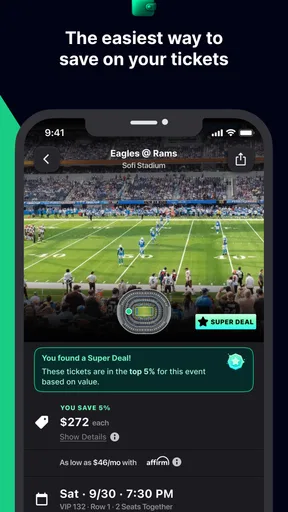
One thing I loved is how Gametime offers last-minute deals. If you’re a spontaneous person like me, this is a huge plus. You can snag great seats without breaking the bank. Plus, they have this neat feature called "Snap and Sell" that lets you resell tickets in just a few taps if plans change. No more worrying about being stuck with tickets you can’t use!
Community Vibes
Now, let’s talk about the community aspect. The app encourages users to leave reviews and feedback on their experiences, which is super helpful. It feels like a community of event enthusiasts sharing tips and hints. And, because it relies on user feedback, you get a sense of security knowing other fans have your back.
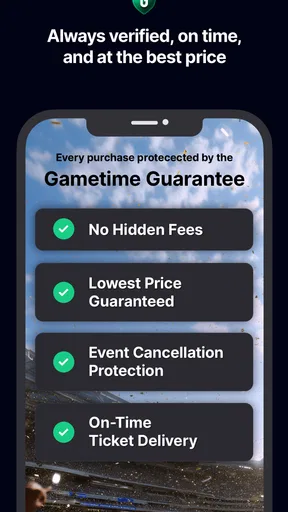
Another feature I found pretty cool is the "Gametime Guarantee." It ensures your tickets are legit and arrive on time, or you get your money back. This really put my mind at ease when purchasing last-minute.
The Verdict
All in all, if you’re someone who loves live events but hates the hassle of finding tickets, Gametime - Last Minute Tickets is definitely worth a try. It’s user-friendly, reliable, and packed with features that cater to the spontaneous spirit in all of us. Next time you’re caught in a ticket jam, give it a whirl. You might just find your next favorite concert or game, without the stress!
So there you have it, folks. Download the app, and who knows, maybe I’ll see you at the next big game!
A few practical checks before installing
Gametime is an events app from Gametime with an average rating of 4.8 from around 85,000 ratings and about 35,000 written reviews. It has been installed over 5 million times, is rated for Everyone, and is free to download. Those figures suggest it has a sizable audience, but they are not a substitute for deciding whether its style of ticket search matches how you like to plan.
The app was released on March 12, 2014, and its current version is 2025.32.0. It requires Android 8.0 or later. I would check that requirement before trying to install it on an older Android device; if the app is not compatible, the event organizer’s website or another supported ticket option may be more useful. The listing’s short description is simply “Gametime,” so I would judge the app by its actual event-search and purchase experience rather than expect that label to explain every detail.
A question people often have is whether “last minute” means they must wait until the day of the event. I would not treat it as a rule to delay buying. The useful point is that the app is oriented toward finding tickets when you are ready to make a plan, including close to an event; if you already know you want to attend something popular, searching earlier through the organizer and the app gives you more time to compare rather than relying on a late opening.
Another reasonable question is whether the guarantee and customer feedback remove the need to check the purchase. They do not. The guarantee is reassuring, and reviews can offer context from other fans, but I would still confirm the event, date, seat information, and final checkout details myself. Reviews are individual experiences, not a promise that every ticket or venue situation will be identical.
My bottom line
For me, the strongest case for Gametime is the combination of event discovery, seat-view context, and a purchase flow aimed at people who are open to going out soon. Its biggest limitation is inherent to that same approach: last-minute availability can narrow your choices, and no interface can make an unsuitable date, seat, or budget work. I would keep it handy for flexible plans and spontaneous nights, while using a venue’s direct channel when certainty about a particular event or seating requirement matters more.
Pros
- User-friendly interface
- easy navigation.
- Instant ticket delivery to your phone.
- Offers significant discounts on events.
- Wide variety of events to choose from.
- Customer support is responsive and helpful.
Cons
- Limited refund options available.
- Occasional app crashes reported.
- Some events not listed in smaller cities.
- Prices can fluctuate unpredictably.
- Service fees can be relatively high.
FAQs for Gametime - Last Minute Tickets
What is Gametime and how does it work?
Gametime is a mobile app that allows users to purchase last-minute tickets for sports, concerts, and theater events. The app provides a seamless experience by offering digital tickets that can be accessed directly from your phone. It also includes features like interactive seat maps and the ability to see a view from your seat before purchasing.
Are the ticket prices on Gametime competitive compared to other platforms?
Yes, Gametime often offers competitive pricing, especially for last-minute deals. The app utilizes a dynamic pricing model, which means ticket prices can fluctuate based on demand and availability. Users often find that they can snag great deals on tickets closer to the event date.
Is it safe to purchase tickets through Gametime?
Absolutely. Gametime provides a secure platform for transactions and guarantees that tickets are authentic and valid for entry. The app has a secure checkout process and offers customer support to assist with any issues that might arise before, during, or after your purchase.
What happens if an event is canceled or postponed?
In the event of a cancellation, Gametime offers a full refund to the original payment method. If an event is postponed, tickets are typically valid for the rescheduled date. The app's customer support team is available to assist with any questions or concerns regarding changes to event schedules.
Can I sell my tickets on Gametime if I can't attend an event?
Currently, Gametime focuses on providing tickets to buyers rather than facilitating resale. However, you can reach out to their customer support for guidance on options if you find yourself unable to attend an event after purchasing tickets through the app.


